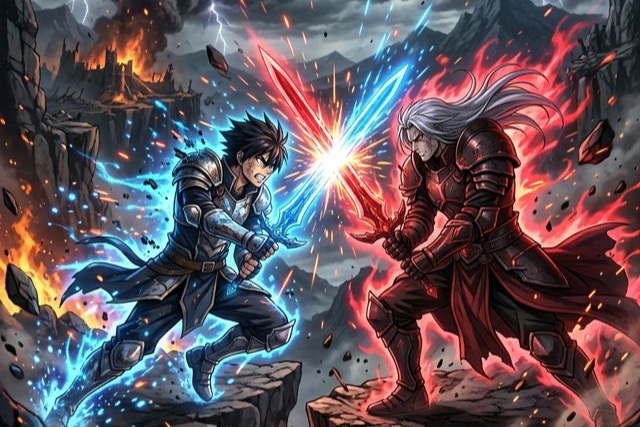
Seedance 2.0 Anime Fight Guide: Create Viral Sakuga Clips
Master Seedance 2.0 anime fight workflows from X & Reddit. Learn Sakuga camera hacks, impact frames, and motion references to create viral AI videos.
Scroll through the AI video communities on Reddit or X right now, and you'll notice a massive trend: Seedance 2.0 anime fights.
Users aren't just generating static, panning shots of anime characters anymore. They are producing "Sakuga"—a Japanese term used by anime fans to describe moments of exceptionally high-quality fluid animation, dynamic camera work, and intense action. Think Demon Slayer (Ufotable) or Jujutsu Kaisen (MAPPA) levels of hype.
But how are creators actually getting the Seedance 2.0 model to understand martial arts choreography, impact frames, and dynamic camera angles without it devolving into a blurry, morphed mess?
We’ve scraped the top megathreads on Reddit's r/aivideo and viral threads on X to bring you the ultimate playbook for generating god-tier anime fight scenes.
The Secret Sauce: Why Seedance 2.0 Built for Anime
Before we dive into the hacks, it's worth understanding why Seedance 2.0 is currently dominating the anime niche:
- Physics Engine Comprehension: Unlike older models that just "melted" pixels to simulate movement, Seedance 2.0 understands spatial volume. When a character throws a punch, the model calculates the physical weight and kinetic energy.
- Audio-Driven Action: The native audio sync feature allows creators to upload intense battle tracks or sound effects (clashing swords, explosions), and the model automatically syncs visual impacts to the audio peaks.
- The "Universal Reference" Workflow: You can feed it an actual live-action martial arts clip as a motion reference (@Video), and top-tier anime concept art as a style reference (@Image).
4 Viral Hacks for generating Epic Anime Fights
Here are the most upvoted, battle-tested methods from the community.
Hack 1: The "Live-Action to Anime" Pipeline (Rotoscoping 2.0)
If you type "two anime guys fighting" into a text prompt, you'll get a generic, clunky animation. The absolute best fight scenes you see on X are utilizing motion references.
The Workflow:
- Find a real-life martial arts sparring video, a movie stunt sequence, or even record yourself doing choreography.
- Upload it as @Video1 in Seedance 2.0.
- Upload an image of your anime characters or style sheet as @Image1.
- Prompt: "In the exact animation style of @Image1, replicate the fluid combat choreography and pacing of @Video1. 2D anime style, crisp line art, cel-shaded."
The AI essentially acts as an automated rotoscoping artist, translating real human physics into 2D anime glory.
Hack 2: Triggering "Impact Frames"
Impact frames are those split-second, high-contrast (often black-and-white or inverted color) frames used in premium anime to emphasize the sheer force of a blow. AI usually smoothes these out unless you explicitly demand them.
How the Reddit pros prompt it: Instead of saying "they hit each other hard," use specific animation terminology.
Winning Prompt Formula: "2D anime animation, extreme dynamic action. Character A throws a devastating punch. At the exact moment of connection, insert stylistic black-and-white impact frames with distorted heavy line art. Screen shake, massive particle sparks, debris flying."
Hack 3: Mastering "Sakuga" Camera Angles
A fight isn't just about the punches; it's about how it's filmed. Seedance 2.0 has an incredible spatial understanding, but you have to direct the "virtual cameraman."
Here are the camera prompt cheat codes currently going viral on X:
- For speed: "Dutch angle, low angle tracking shot following the character's sprint, extreme speed lines in the background."
- For spatial depth (The 'Ufotable' trick): "3D background with 2D characters, dizzying drone-like orbit camera spinning 360 degrees around the combatants during the clash."
- For devastating hits: "Sudden snap-zoom into the character's eye right before the attack, followed by a rapid dolly-out as the explosion occurs."
Hack 4: The 12-Frame Blur Fix
A common complaint on Reddit is that fast limbs turn into a blurry, multi-armed mess. This happens because the AI is trying to simulate motion blur but failing to maintain the character's anatomy.
The Fix: Force the model to keep the line art crisp by restricting motion blur in the negative prompt, or by emphasizing shutter speed in the positive prompt.
- Add to Prompt: "Crisp animation, zero motion blur, sharp focus on combatants, high shutter speed, distinct smears rather than blurry pixels."
The Ultimate "Boss Battle" Starter Prompt
Want to try it out immediately? Here is a synthesized prompt based on the most successful community generations:
"Masterpiece 2D anime style, MAPPA studio aesthetic. A high-octane hyper-choreographed sword fight between two warriors in a crumbling ruined temple. Dynamic lighting, glowing particle effects, intense aura. The camera performs a rapid dolly-pull back as they clash, causing a shockwave. Insert high-contrast black and white impact frames on contact. Fluid animation, vivid colors, cinematic composition."
The Verdict
Generating top-tier anime fights is no longer about getting lucky with the AI slot machine. It's about acting like an animation director. By utilizing video references, mastering camera terminology, and forcing impact frames, you can push Seedance 2.0 to deliver breathtaking Sakuga that rivals professional studios.
Ready to direct your own anime? Jump into Seedance 2.0 and let the battles begin.
Categories
More Posts

From Idea to Viral: 5 Seedance 2.0 Video Templates
Combining 2026's hottest short video trends with ready-to-use prompt combinations and logic.

How to Choose AI Video Reference Assets: A Multimodal Guide
Learn how to organize AI video reference assets across character images, product shots, motion videos, audio, and 3D blockouts without creating conflicting instructions.

E-commerce Video Explosion: 'Shop-Ready' Shorts
Learn how to transform static product images into high-conversion commercial videos using Seedance's specialized e-commerce rendering engine.